Fixing “Certificate (X509Error) Signed by Unknown Authority” in Docker
How to fix the Docker error certificate (X509Error) signed by an unknown authority?
What is the X509 error in Docker?
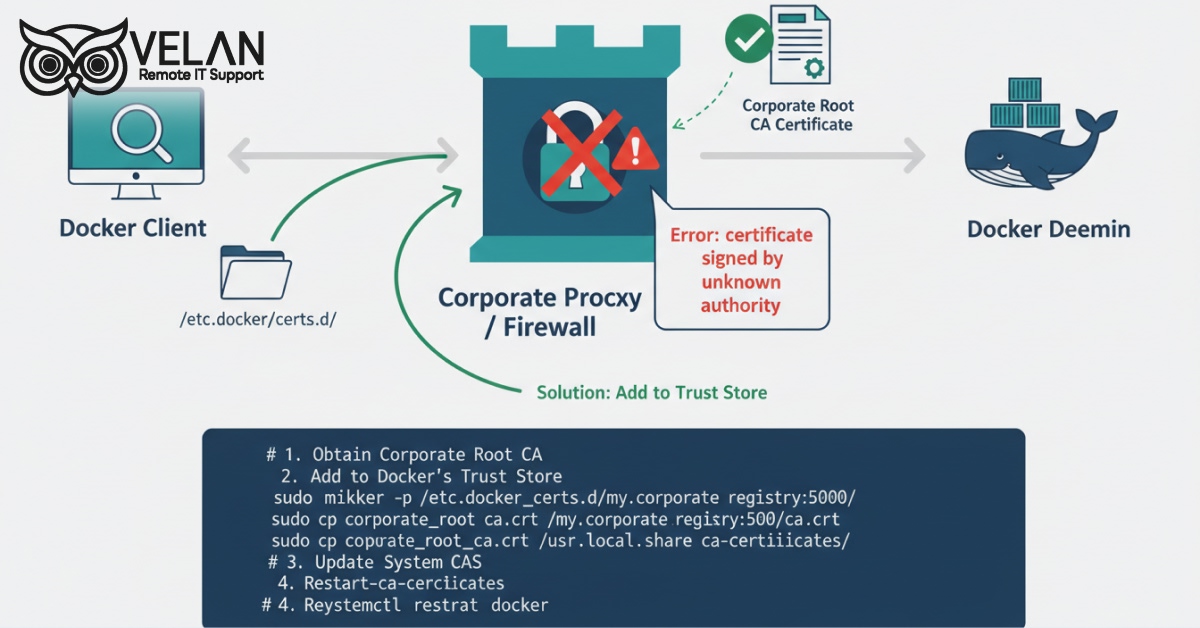
The error message displayed as ‘failed to verify certificate: x509: certificate signed by unknown authority’ is related to a certificate validation problem. It appears when Docker cannot verify the SSL/TLS certificate presented by a Docker registry or server.
The reason for the X509 error:
An X509 error occurs when your Docker registry does not have an SSL/TLS certificate issued by a recognized CA. The self-signed certificates are not fully trusted by default.
While connecting to a registry, Docker verifies the authenticity of the certificate by searching for the issuer. If it is not found, then Docker blocks access.
How it works
· A Docker registry presents a self-signed certificate.
· Docker checks its trusted CA store.
· If it failed to find the self-signed certificate there, then Docker rejects the connection and throws an x509 error.
· If you add that certificate to Docker’s trusted certificate store, Docker will trust it from then on.
· The connection succeeds.
How to solve the X509 error. Step-by-step procedure
Restart Docker so that it can recognize any changes made to the OS certificate. Docker also provides an additional location where you can add an individual registry server CA. Now, to place the CA certificate, follow the below-given steps.
/etc/docker/certs.d/<docker registry>/ca.crt
The port number should be specified in the image tag, if needed.
Example: /etc/docker/certs.d/my-registry.example.com:5000/ca.crt
If this method couldn’t solve the problem, then do the following steps.
- Create a file /etc/docker/daemon.json and add insecure-registries
{
“insecure-registries” : [“docker.domain.com:443”]
} - Restart the Docker daemon by executing the command
systemctl restart docker
- Make a directory with the same name as the host
mkdir -p /etc/docker/certs.d/docker.domain.com
- Save the certificate in the newly created directory
ex +’/BEGIN CERTIFICATE/,/END CERTIFICATE/p’ <(echo | OpenSSL s_client -show certs -connect docker.domain.com:443) -suq > /etc/docker/certs.d/docker.domain.com/docker_registry.crt
- Top of Form
- Bottom of Form
Need technical support for Docker installation?
At Velan, a leading remote IT services provider, we offer expert Docker consultation services for global businesses.
Our experienced engineers assist with Docker installation services. Our offerings cover from configuration and troubleshooting to security hardening and ongoing maintenance.
We ensure quality service (ISO 9001) and strong data security (ISO 27001) in our solutions. As a top outsourced managed IT services company, we also offer 24/7 help desk support to help you to efficiently manage your IT environment.
Know the answers to the commonly asked questions on Docker certificate errors
SSL/TLS certificates confirm that the data is secure when various parts of the Docker environment try to establish a connection. When a client sends a request to the daemon, it must prove itself that it is authorized to perform the requested operation. It is these certificates that authorize clients to access the Docker daemon.
The certificate trust issues in Docker are usually because of this self-signed certificate. Browsers and applications refuse to recognize it as a reliable source. If you want to find out whether a certificate is self-signed or not, look at the issuer field to see if the CA is listed.
To skip the verification process of a self-signed certificate, enter the following in the Docker run command:
-e NODE_TLS_REJECT_UNAUTHORIZED=0
Categories
- Applications 011